


Bible Path: Prayers & Widgets
4.8356.00 Reviews
App Specs
- Version
- 2.4.9
- Updated On
- License
- Free
- Downloads
- 1,000,000+
- Developer
- Deep Flow Apps
- Categories
- Books & Reference
- Platform
- Android, iOS
Screenshots



 Analysis by AppCompare
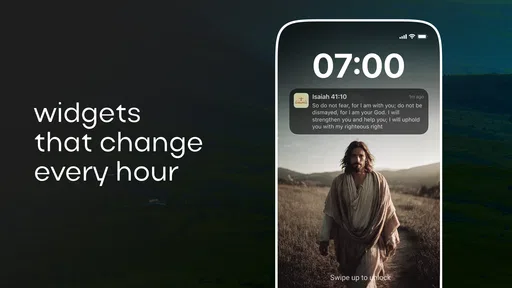
My favorite part of Bible Path: Prayers & Widgets is how it can bring a short moment of scripture into the ordinary spaces between other tasks. Rather than requiring me to sit down for a long reading session, its home-screen widgets make a verse visible when I check my phone. I find that small change in context useful: a passage can catch my attention before messages and errands take over.
A verse on the screen changes the rhythm
A Bible widget is most useful when it feels like a gentle prompt, not another notification demanding a response. With this app, the central idea is to keep scripture within easy view, so I can pause, read a line, and carry on without opening a separate reading app or searching for a passage first. That convenience suits brief moments of reflection better than a deep study session.
I would treat the widget as an invitation rather than a complete devotional routine. Seeing a verse can prompt me to read more later, think about a phrase during the day, or say a quick prayer. It does not automatically make a busy morning contemplative, but it removes one small obstacle: remembering to seek out a passage in the first place.
Making the widget work for your habits
When setting up a home-screen widget, I’d choose a spot where I naturally pause, rather than crowding it among other app shortcuts. A page I visit in the morning can make the verse part of a familiar routine; placing it somewhere I rarely look weakens the whole point. This is a practical detail, but it matters more than adding several widgets just because the option exists.
I’d also give the verse a moment of attention instead of treating it like wallpaper. Reading it once when I unlock my phone and returning to it later can make the feature feel intentional without turning it into a chore. If a passage raises a question, I can use that as a cue to open a Bible or consult a trusted study resource; the widget is a starting point, not a substitute for context.
Where hourly verses fit—and where they don’t
The app’s focus on verses throughout the day can suit someone who likes frequent reminders of faith. It may be especially welcome during a workday with natural breaks, or at home when a phone check offers a brief pause. But a prompt that feels encouraging to one person can become background noise to another. I’d keep the experience aligned with my attention and routine rather than assuming more reminders always mean more reflection.
This is also why the widget approach differs from opening a conventional Bible app for a planned reading. A dedicated reading session gives me room to follow a passage and its surrounding chapters; a glance at the home screen is quicker, but necessarily more limited. For thoughtful study, I would turn to a full Bible and commentary. For a compact cue to remember scripture amid everyday tasks, a widget has a clear advantage.
Worth Reading Before You Choose

EA SPORTS FC Mobile 26 Is a Bigger Football Game, but It Takes Time

Flipboard Shows What News Apps Must Do Beyond the Feed

Switching to Android Auto Means Rethinking Your Driving Routine

Google Calendar Makes a Crowded Week Easier to Manage

Ludo King Makes the Most of the Minutes Between Plans

Baby Panda World Brings Quick Play to Modern Phones, but Its Game Library Feels Busy
Getting Started with Bible Path
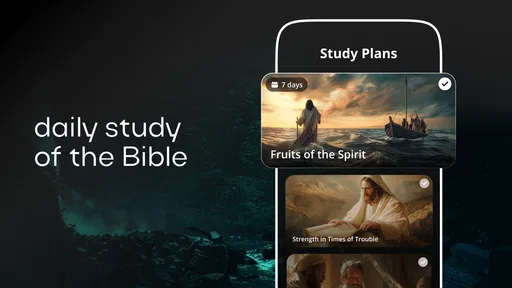
The first thing that caught my eye when I opened Bible Path: Prayers & Widgets was its sleek design. The interface is intuitive, making navigation a breeze. It feels like the developers really put a lot of thought into making this app both aesthetically pleasing and user-friendly.
Once you get past the initial setup, you’re welcomed into a world of spiritual resources. The app is packed with various features, from daily prayers to Bible widgets, that are perfect for both beginners and seasoned practitioners.
An Array of Features
The app offers daily prayers that are tailored to your preferences. Whether you're looking for morning inspiration or evening reflection, Bible Path has got you covered. You can even set reminders to ensure you never miss your spiritual time.
Another feature that's really cool is the Bible widgets. These can be customized and added to your home screen, providing quick access to your favorite verses. It’s a fantastic way to keep motivation and positivity at your fingertips throughout the day.
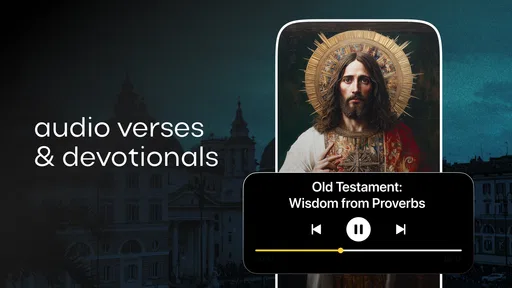
Moreover, there’s an extensive library of devotionals and meditations. You can explore different themes and find exactly what resonates with you. It feels like having a spiritual guide, always ready to offer wisdom and comfort.
What Makes It Stand Out?
One of the standout aspects of Bible Path is its community feature. You can connect with other users, share insights, and even join group prayers. It’s like having a global church community right on your phone.
Additionally, the app supports offline access, which is perfect for those moments when you need a spiritual boost but don't have internet access. This thoughtful addition ensures that your spiritual journey is uninterrupted, no matter where you are.
Final Thoughts
In a world where we’re constantly on the go, having an app like Bible Path: Prayers & Widgets is a blessing. It brings spirituality into our daily lives in a way that's accessible and meaningful. Whether you’re new to prayer or a seasoned believer, this app offers something for everyone.
If you’re searching for a way to integrate spirituality into your busy schedule, give Bible Path a try. It might just become your new favorite app, a little pocket-sized sanctuary in the hustle and bustle of life.
A realistic routine, not another obligation
Imagine checking your phone while waiting for the kettle to boil, then noticing a verse before the day’s messages arrive. That is the kind of small, believable use this app encourages. I might read the line, take a breath, and return to it during a lunch break. The benefit is not that a widget transforms a routine; it is that it gives a familiar pause a more reflective direction.
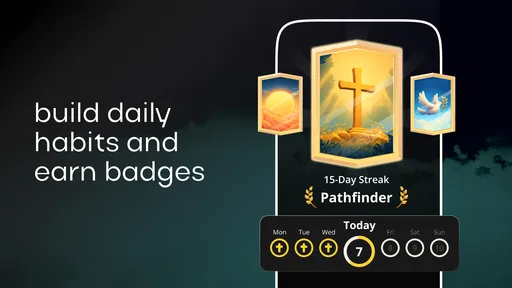
For a useful habit, I’d connect the widget to something already happening, such as the first phone check of the day or a quiet moment before bed. That makes it easier to remember without adding a complicated schedule. If I miss a day, I would simply pick it up again rather than treating the app as a streak-based obligation.
Choosing between a widget and a full Bible app
Compared with the usual Bible-reading alternative, a home-screen verse is quicker to encounter but offers less room for interpretation. It is well suited to short prompts, while a conventional Bible app is the better choice when I want to search a specific passage, follow a reading plan, or compare surrounding chapters. These approaches can complement each other: the widget can spark interest, and a fuller resource can provide the depth.
It also differs from a general quote or inspiration app because the focus here is explicitly devotional. That is a strength if I want scripture and prayer to shape the reminder. It is less suitable if I only want a broad collection of uplifting sayings, or if I prefer to choose every passage through a study workflow rather than meet verses through a widget.
Practical trade-offs to consider
Home-screen space is limited, so adding a widget means deciding what deserves that space. If the phone is already crowded with calendars, work tools, and messages, the devotional prompt may be easy to overlook or may make the screen feel busier. I’d try one placement first and see whether it genuinely earns its spot before making it part of my daily layout.
There is also a difference between a verse that appears at a convenient moment and one that matches exactly what I need. A spontaneous passage can be a welcome prompt, but it is not the same as choosing a reading for grief, a theological question, or a structured study. In those situations, I would seek a specific passage and read it in context rather than expect a changing prompt to answer the need by itself.
Reminders can help establish a routine, but I would use them thoughtfully. Someone who already receives many alerts may prefer relying on the visible widget instead of adding more interruptions. Conversely, if a prompt is easy to miss, a reminder may be helpful. The right balance depends on whether I respond better to a glanceable cue or a direct nudge.
Who is likely to get the most from it?
I can see this working particularly well for readers who want faith to have a visible place in an otherwise busy phone routine, and for people who enjoy short devotional moments rather than long sessions every time they open an app. Beginners may appreciate having a simple prompt to start from; regular readers may use the widget as a reminder to return to a verse or prayer during the day.
I would skip it if my main goal were detailed Bible research, a highly structured course, or an entirely quiet phone with no devotional prompts on the home screen. The app’s mix of widgets, prayers, devotionals, and community makes it broader than a verse display, but those features do not replace a church, a study group, or a carefully chosen reference text. It is best viewed as a personal companion for everyday reflection.
What to expect before installing
Published by Deep Flow Apps, this free Books & Reference app has a 4.8 average from around 53,000 ratings and has passed one million installs. It is rated for Everyone, and the current release is version 2.3.1, with Android 6.0 as the minimum requirement. In-app purchases range from $4.99 to $49.99 per item, so I would check the purchase details in the app before committing to anything beyond the free experience.
Its release date is August 2, 2024, which is useful context for anyone comparing it with long-established Bible tools: this is a relatively recent option, not a replacement for every mature study resource. The practical question is whether its devotional presentation fits the way I use my phone. If I want quick, recurring contact with scripture, that focus is appealing; if I want a library-first study environment, a traditional Bible reference app will likely serve me better.
A measured recommendation
Overall, I’d recommend this app to someone who wants brief moments of prayer and scripture to fit naturally into the day, especially if seeing a verse on the home screen is more motivating than remembering to open a separate reader. Its strongest idea is modest but useful: make a devotional prompt easy to encounter in the middle of ordinary life.
I would approach it with realistic expectations. A widget can remind me to pause, but reflection still depends on what I do with that moment. For that purpose, Bible Path offers an accessible starting point, while readers who need deeper context or a carefully organized study routine should pair it with a dedicated Bible resource. If that balance sounds right, it is worth trying as a small, low-pressure addition to a daily routine.
Pros
- User-friendly interface for easy navigation.
- Customizable widgets for daily inspiration.
- Includes a wide range of prayer topics.
- Offline access to content for convenience.
- Regular updates with new features.
Cons
- Limited language options available.
- Some features require a premium subscription.
- Occasional ads can disrupt usage.
- Widgets may not work on all devices.
- No community or social sharing features.
FAQs for Bible Path: Prayers & Widgets
What features does Bible Path: Prayers & Widgets offer?
Bible Path: Prayers & Widgets provides a comprehensive suite of features, including daily prayers, customizable widgets for your home screen, and a vast library of Bible verses. Users can explore different translations, set reminders for daily devotionals, and access thematic prayer guides. The app also allows users to bookmark and share their favorite scriptures.
Is Bible Path: Prayers & Widgets available for both Android and iOS?
Yes, Bible Path: Prayers & Widgets is available for both Android and iOS platforms. The app can be downloaded from the Google Play Store and the Apple App Store, ensuring a seamless experience across different devices. Make sure your device meets the minimum system requirements for optimal performance.
Are there any subscription fees or in-app purchases?
Bible Path: Prayers & Widgets is free to download, but it offers in-app purchases for premium features. These may include ad-free browsing, exclusive prayer content, and additional widget customization options. Users can choose a subscription plan that best suits their needs, with monthly and annual options available.
How can I customize the widgets in the app?
Customizing widgets in Bible Path: Prayers & Widgets is straightforward. Simply long-press on your home screen and select the widget option. Choose Bible Path from the list, and you'll be able to select from various widget styles and sizes. You can also personalize the content displayed, such as daily verses or prayer prompts.
Is Bible Path: Prayers & Widgets suitable for all age groups?
Bible Path: Prayers & Widgets is designed to be user-friendly and accessible for all age groups. The app's interface is intuitive, making it easy for younger users and seniors alike to navigate. It’s an excellent tool for families looking to incorporate daily devotions and prayers into their routine.


